As far as I am aware, it isn't officially supported/recommended to make regular items into children of their tags, but for my purposes, InfoQube works much more intuitively when I do this. With this approach, I can easily view, in a single grid, a full hierarchy of tags and subtags with their items and subitems. (A good example of something similar is Wrike's implementation of virtual folders that function like tags.) Am I correct that this approach isn't officially supported, and if so, could it become supported? The ideal for me would be to have an option whereby tagging an item would automatically add the tag as a parent. Thanks for considering!
Suggestions
Comments
Hi Lucas, Adding non-tag…
Hi Lucas,
Adding non-tag items under tag items isn't a problem. It just messes up the tag hierarchy by adding extra items. IQ should work just fine, though it is definitely not tested per-se.
There is no plan to implement tag inheritance, you can use fields for this.
That said, have you considered using the Grid > Sort > Group-by bar? In my tests, it allows for a display of items under each tag AND adding items in this display does automatically assign tags.
HTH!
Pierre_Admin
IQ Designer
Thanks, Pierre. In my…
Thanks, Pierre. In my experience, the tag hierarchy doesn't seem to get messed up with my approach because the tag pane (and the tag list in nav bar) still only show actual tags. In the Tags grid, what I do is just use a visual indicator, such as making all tags italicized.
Yes, group-by is the best workaround short of making items children of their tags. But with group-by, other than being a bit finicky, the main limitation in my experience is that you don't get a full tag hierarchy in the grid, just a flat list of tag groups with item hierarchy underneath.
Anyway, I can just stick with my idiosyncratic system for now. (I've tried to use Visual Basic to automate making items into children of their tags, but no luck so far)
Thanks again
Thanks for sharing some of…
Thanks for sharing some of your system. I'm always looking for better ways to organize info. I'm going to work through what you suggested and see how it fits with what I'm trying to do.
There's one part I don't understand. You say your system doesn't mess up the tag hierarchy because the tag pane only shows actual tags. But if you're adding your items underneath the tags in the tags pane, then they ARE tags, aren't they? I'm obviously not getting what you're doing exactly.
Wayne
Hi Wayne, if you add items…
Hi Wayne, if you add items via the Tags pane or the Tags grid, then the new item will be a tag. But, in my experience, if you create an item first and then move it under a Tag, it remains a regular item. For example, you can first use the "Mark Items" command on your items, then go to the Tags grid, and then use "Add as Sub-Items" command so that the marked items become children of the tag.
For the system to work as I am describing, it's a bit more effort, because you first tag the items with the tag in question, and then you also add the items under the tag. It's two steps, but I find it useful.
To really get it working the way I want requires a few more steps as well. For exampe, I also tag sub-tags with their parent tag. Normally, a sub-tag is simply a child of a parent tag, but tags themselves are not tagged. But in my system, I also tag the sub-tags with their parent tags. This way, when I double-click on a parent tag from the tag pane, the resulting view will show the full hierarchy of subtags with their items under them. (I assume that tagging tags is also not offically supported, but I haven't run into any problems with it.)
This system is very much still a work in progress. But I've been moving more and more towards using tags for anything that resembles a folder or subfolder. So, in the past, I relied more on regular items to create hierarchies, but now most of the organizational hierarchy is within the tag pane, which I use as a robust folder system. The only issue is that it's a bit laborious to maintain this approach at present, but maybe I'll figure out a way to expedite it with Visual Basic code.
EDIT: One additional point: The approach I'm describing makes it so that the Tags
panegrid will show both Tags and any regular items under those tags, but it's also easy to use a filter and/or create a separate filtered grid that only shows Tags.Thanks for writing that out…
Thanks for writing that out in detail. I'll have to do some step-by-step testing to see how it really works.
I like to do historical research as a retirement hobby. This requires overwhelming stacks of info to be organized and processed.
I'm sure I'll use some combination of outlining and tagging, but working out the exact mix has proven elusive. You really don't know the pro's and con's of different methods until you try to implement them.
Here's a brief overview of what I'm trying to do:
1) Gather all sources relevant to the topic.
2) Integrate source material into InfoQube, either by copying in full text, or creating links to external pdf files etc.
3) Organize source material by topics using some combination of tagging and/or multiple parents. This allows you to see what every source has to say about a particular topic.
4) Write a brief summary of each source to make it easier to manually review and find things.
Wayne
This sounds like a very…
This sounds like a very interesting project! As you say, it seems to take some experimenting to find what works.
Just one clarification: I somehow managed to completely contradict myself at the end of my last comment above (now corrected) and accidentally typed that the Tag pane would show regular items, which is not the case. What I had meant to write is that, with my approach, the Tags grid will also show regular items (that are children of Tags). Sorry for the confusion!
Also, one other thing to mention here, as I think about what you wrote: depending on one's use case, another limitation with simply using multiple parents for organization instead of tags is that Infoqube doesn't currently show multiple parents in a column in grids. One needs to look in the properties pane. But you can see multiple tags within the grid.
Thanks for the idea! I…
Thanks for the idea! I needed a picture to understand iI so I did some experimenting and found it's relatively easy to implement for an existing tag. (double click the photo tag to get the 24 items in the scratch grid, select all, mark items, select photo in the tags grid and add as sub-items. I do anticipate this becoming an excellent way to navigate for a tag fan.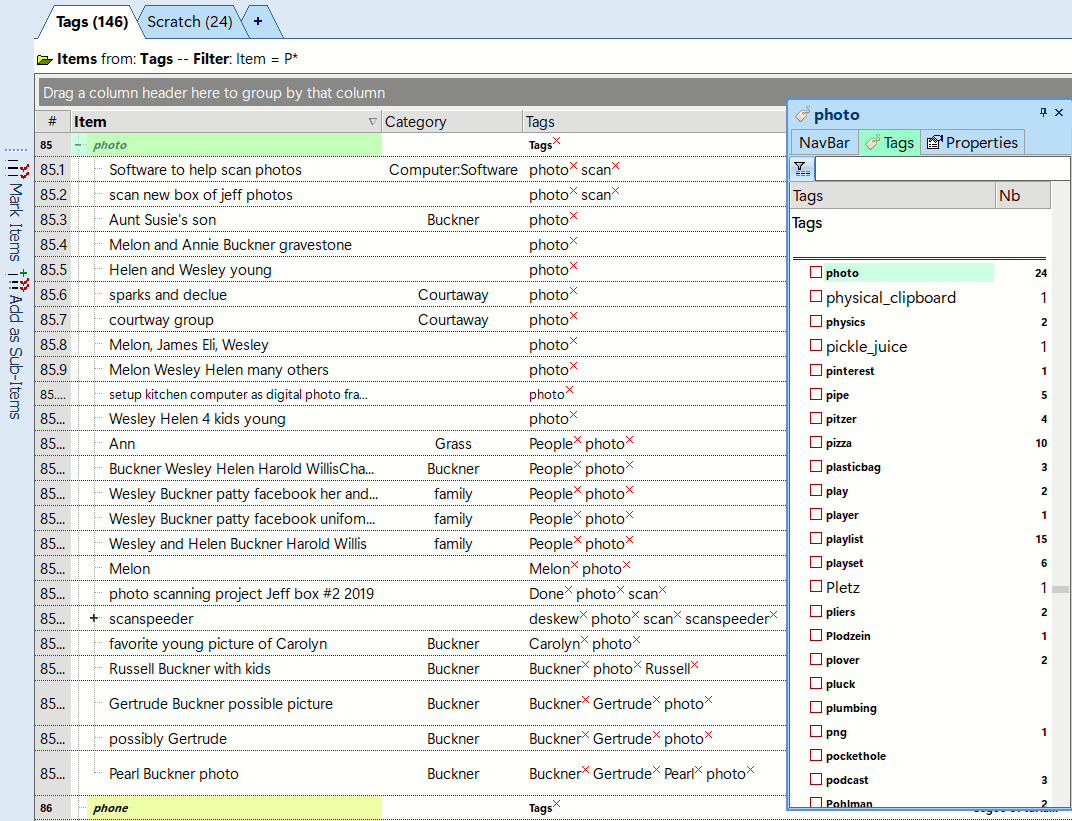
Nice! Looks like a great…
Nice! Looks like a great system. I'm glad my musings were helpful!
Hi all ! Interesting…
Hi all !
Interesting discussion. I cannot guarantee that adding non-tag items under what is basically a tag hierarchy will not, as the item list increases, cause some performance issues. So keep an eye open for any slowdown, if any.
As to simplifying it's use, keep in mind that tags are just regular items with values for 2 fields (Tags and TagID), and that the Tags grid is just a regular grid with 2 key properties: Auto-assign the field Tags and ItemLocked to all items. So... if you copy the Tags grid and remove these auto-assigns (or create a new grid with Tags as its source), non-TLI items created in this grid will NOT be tags, just regular items. Nothing else to do.
HTH !
Pierre_Admin
IQ Designer
Thanks, for that explanation…
Thanks, for that explanation.
One of my biggest problems has been how to bridge the gap between gathering (tags) and permanent storage (outlines). Everything I've come up with requires several unwanted manual steps to bridge the gap between tags and outlines.
I made a feature request to allow items to be automatically assigned to parents using tags. That seemed to be a solution to my problem but I don't know if it's possible or desirable.
1) Create tag "Example1"
2) Create item "Topic1"
3) Set "Example1" tag to assign all tagged items as subitems under the header "Topic1"
This would satisfy my desire to have all tagged items residing in a permanent outline structure without requiring manual steps to keep it updated.
Is that a reasonable suggestion? Or is there a way to accomplish something similar using existing tools?
I don't like items being hidden under tags and only visible when you explicitly launch the tags.
Wayne