
Sorry for a lot of questions lately, but I have been trying to use IQ in new ways.
Also sorry if this is a trivial question...
I am often not able to enter information in a Table in the Doc pane. I open an html template in the doc pane.
When I hover over the table, the cursor turns into double arrows (for table resizing):
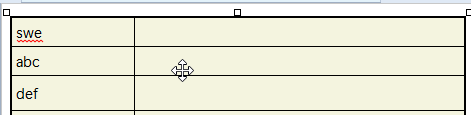
I double-click in Row1, Col2 to enter edit mode and enter text
However, I am not able to double-click in R2C2; the cursor is still showing the double cross.
If I enter edit mode in R1C2 and use the arrow key to move down, it skips to R3C2.
Here is the html code:
<HTML><HEAD><META name=GENERATOR content="InfoQube v1.127.1"><META charset=UTF-8><LINK id=SSDef936 rel=stylesheet type=text/css href="D:\@Prog_Portable\InfoQube_v1.124.6-PORT\AppFiles\default.css"></HEAD><BODY><TABLE style="HEIGHT: 85px; WIDTH: 295px"><TBODY><TR><TD width=108>swe</TD><TD></TD></TR><TR><TD>abc</TD></TR><TR><TD>def</TD><TD></TD></TR></TBODY></TABLE><P> </P></BODY></HTML>
Comments
I edited the html code for…
I edited the html code for the table by adding a <TD></TD> tag after the abc tag. I can now enter data in the table. I am not sure why my saved html template is missing this?
I edited all my tables and created a new template, and it is working now.
Two questions though:
1. How can I set the default directory for the template location? Now it defaults to the program directory (users/admin)
2. How can I set the path for the stylesheet (
default.css) that is used for the table?