
Hi IQ Users !
The highlight of v1.128 is the new Calendar "List View" that also supports search.
Unlike grids, the new List View properly handles repeating events !
v1.128 also includes numerous tweaks and bug fixes.
In v1.128.15:
- Fixed: Find Filter dialog: Did not refresh when changing the theme. Improve font color for dark theme
- New: Calendar: Event list grid view, supports search
- New: Calendar: When on the first / last event in the view, the Calendar will scroll to show the previous / next day
- New: Grid: Toggle case now works for multiple items
- New: Grid: Hover over tags column now shows the tag name
- New: Grid: Tree indent can now be set on a grid per grid basis
- New: Grid: Edit font ratio setting (to improve wordwrap during editing)
- New: Views and Doc panes: When floating, new menu to maximize the pane
- New: Doc pane / Item Editor: New option to save the content before a paste (paste can cause an IQ crash and this alleviates this issue, until a real fix is found)
- New: Doc pane: Option to automatically expand / collapse pane based on content (On by default)
- New: Properties pane: Show as grid column: if column is shown but hidden, option to un-hide it
- New: [ [ links: in tooltip show the item parent path (to help identify similar items)
- New: Reminders: Reminder message can now be set. Can be different from the item name
- New: Reminders: Hide can now also delete an event
- New: Field: Vertical alignment setting. Overrides the program setting (General > Grids > Vertical alignment)
- New: NavBar: Copy Grid command, Grid Groups > Add to Group command
- New: New event duration is set to the ItemDuration field default value (default=1 hour)
- New: Ecco Import dialog now supports Dark mode
- New: HTML Export: Subject is now a dropdown with previous entries shown
- New: Export to text files now supports Dark mode
- New: Export dialog: No longer a modal dialog
- New: Export dialog: Email merge: Pause 1 minute every 10 emails, 10 minute every 100 emails
- New: Panes: Resizing pane now shows content while resizing
- New: Clipboard: Paste a clipboard image now creates a PNG file (previously it was a JPG file)
- New: Copy link > Copy email address when appropriate
- New: Many dialogs were updated to support Dark mode
- Change: For non-repeating events, past events from the last 31 days are now available to the Reminders app. Before it was just the last 7 days
- Change: Multi-user settings were removed, and the feature is disabled. It was buggy and a robust implementation is now part of IQ Pro
- Fixed: Multiple UI: If the Scratch grid is not set, multiple features silently failed. A dialog is now shown
- Fixed: Grid: In some cases, the "Delete from this location only" was not shown when it should
- Fixed: Grid: Tag columns: If more than one tag column are shown, the Wordwrap setting applied to all tag columns
- Fixed: Grid: Source = #[TagID] did not work
- Fixed: Grid: When outline labels are used, End + left arrow exits editing
- Fixed: Grid: New grids had the Tree Indent property set to 0
- Fixed: Grid: Copy and Export table: Tags column was empty and checkmarks was not working
- Fixed: Grid: Moving an item left (e.g. promote it) to be a TLI could incorrectly assign a new parent
- Fixed: Grid: Moving an item left (e.g. promote it) was sometimes not possible
- Fixed: Grids: Space characters at the start/end of the grid name were not removed. This could cause some linking issues
- Fixed: Grid: When the display mode is set to Tree view, item expand states were not saved on refresh (only when closing the grid)
- Fixed: Grid: Adding a column to an existing column group failed if the group was not expanded
- Fixed: Grid: Cell copy did not work when Options > Grid > Highlight the full row is ON
- Fixed: Grid: Create event did not always work
- Fixed: Calendar: Current time line (red line) did not update when left pane is not shown
- Fixed: Calendar>Search command did not work
- Fixed: Calendar: Marking a repeating event as Done deselected the event
- Fixed: Calendar: Sometimes clicking on the Today button changes the number of days displayed
- Fixed: Events: Changing a repeating event could make a copy causing multiple reminders to show (for that event)
- Fixed: Events: Editing an event from the popup DateTime editor didn't work correctly for repeating events
- Fixed: Grid Groups: Open All grids in this group command now shows grids in the same order as the group shows them
- Fixed: Properties pane: Double-click on Parents incorrectly opened the scratch grid
- Fixed: Tags: Numeric tag names (e.g. #1234) didn't work correctly
- Fixed: Find Filter dialog: Hierarchy settings were not saved
- Fixed: Dropbox sync: If enabled, IQ would grab the focus from the active application
- Fixed: Add Reminder dialog: Add to selected item(s) was enabled even when no item was selected
- Fixed: Related Items dialog: Now supports Dark mode
- Fixed: HTML Export: Ctrl+A did not work
- Fixed: load custom shortcuts did not clear previous custom shortcuts
- Fixed: Custom shortcuts: Certain shortcuts were lost on restart (those with ; = , - . / ` [ ] ')
- Fixed: System shortcut keys were sometimes not removed when another command used the same shortcut
- Fixed: Many views: Item>Item Events did not work
HTH !
If IQ helps you being productive, consider making a financial contribution
Details here: Contribute to InfoQube Dev, for as little as $3.50 per month
Pierre_Admin
IQ Designer
Announcements
Comments
I upgraded to this version…
I upgraded to this version from 128.2. A while ago, in Options, I had set the default grid font size (option 1.2.2) to 8. In this version, my grids that have no "Default Font" set (i.e., where the option has been left blank) now display text at 10, perhaps ignoring the 1.2.2 setting.
If I open "Manage Grids..." for one of the affected grids, and if I go into the "Default Font" field, type in - say - (Default), then save the grid, then delete "(Default)" so that once again the field is blank, and then save the grid, then the grid displays text at 8 (consistent with my option 1.2.2 setting). Well, until I close and reopen IQ, after which the text in that grid is back to being displayed at 10.
I have one grid where I have the "Default Font" field set to other than blank, and this grid behaves as expected in that the text displays in the custom size that I had specified for that grid.
Thanks for reporting ! Fixed…
Thanks for reporting !
Fixed in the next version, to be released today
Hi IQ Users ! In v1.184 (now…
Hi IQ Users !
In v1.128.5 (now available for download):
Pierre_Admin
IQ Designer
Hi IQ Users ! In v1.128.6 …
Hi IQ Users !
In v1.128.6 (now available for download):
HTH !
Pierre_Admin
IQ Designer
Hi Pierre, Just for…
Hi Pierre,
Just for information – the changes introduced in the latest versions v1.128.5/v1.128.6 (?) fixed the issue of focus randomly switching between grids. I thought it was a problem on my end, but it seems something has changed in the app. Regardless of whether the change was intentional, I'm extremely grateful because it was a bothersome issue.
Thanks, and keep up the good work!
I've had this problem but…
I've had this problem but haven't posted a thread about it.
I work with side-by-side panes. Many times when I perform an action in one pane it gets executed in the other pane, editing or deleting the last item I was on instead of the current.
Like most of my problems, it comes and goes. I'm hoping this update clears it up.
Wayne
Interesting... Is it side-by…
Interesting... Is it side-by-side "panes" (as used in a dashboard) or tab groups?
I don't use tab groups much but do have multiple panes (in a dashboard) and haven't seen this
Hi Pierre, This is my setup…
Hi Pierre, This is my setup. For me, the problem occurred after performing an action with a keyboard shortcut (deleting an item, marking it as done, etc.), and after the action, the focus would jump to another item in a different grid. I hope the problem is permanently resolved.
Not sure if you were asking…
Not sure if you were asking me or TMZ. My set up is side by side tab groups =
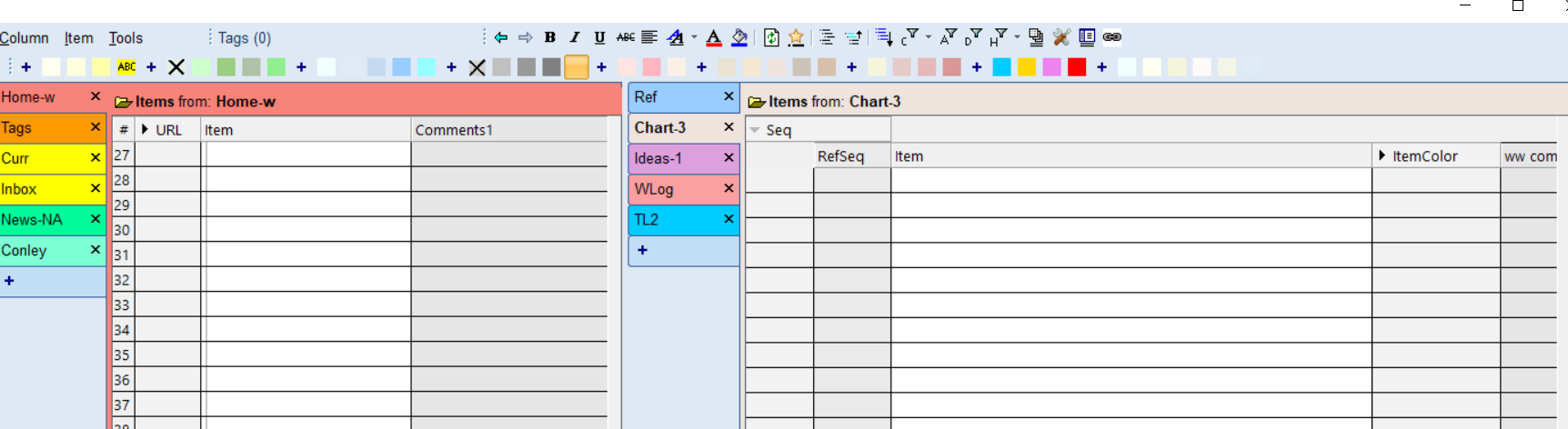
My current tentative conclusion is that my problems are caused by Windows resource depletion. My (limited) understanding is that Windows requires resources beyond simple RAM. When these become depleted, programs can behave erratically.
That would explain why I have problems no one else has, and why the problems come and go randomly. Bugs wouldn't behave like that.
Wayne
Hi IQ Users ! In v1.128.7 …
Hi IQ Users !
In v1.128.7 (now available for download):
HTH !
Pierre_Admin
IQ Designer
Hi IQ Users ! In v1.128.9 …
Hi IQ Users !
In v1.128.9 (now available for download):
(paste can cause an IQ crash and this alleviates this issue, until a real fix is found)
HTH !
Pierre_Admin
IQ Designer
Hi IQ Users ! in v1.128.10 …
Hi IQ Users !
in v1.128.10 (now available for download)
HTH !
Pierre_Admin
IQ Designer
Hi IQ Users ! In v1.128.12 …
Hi IQ Users !
In v1.128.12 (now available for download):
HTH !
Pierre_Admin
IQ Designer
Hi IQ Users ! In v1.128.14 …
Hi IQ Users !
In v1.128.14 (now available for download):
HTH !
Pierre_Admin
IQ Designer
Hi IQ Users ! In v1.128.15 …
Hi IQ Users !
In v1.128.15 (now available for download):
HTH !
If IQ helps you being productive, consider making a financial contribution
Details here: Contribute to InfoQube Dev, for as little as $3.50 per month
Pierre_Admin
IQ Designer
Hi IQ Users ! We're working…
Hi IQ Users !
We're working on a new grid feature: Hoist History, a list of recently used hoists.
It was possible to hack this using Marked Items, but this is a much cleaner implementation with less friction !
HTH !
Pierre_Admin
IQ Designer