Any way to refresh all grids?
I've noticed that "refresh" seems to apply only to the current grid. Is there any way to refresh all grids at once?
- Read more about Any way to refresh all grids?
- 2 comments
- Log in or register to post comments
I've noticed that "refresh" seems to apply only to the current grid. Is there any way to refresh all grids at once?
Now that we have very robust options for hierarchical tags, I'm trying to figure out how to make child items inherit the tags of parent items. The "ItemTags" field doesn't seem to be available in the field management view, so I don't see how to create a Column Inheritance equation. Would there be some may to set certain tags to always automatically be assigned to children of tagged items?
I am wondering if there's any way to automatically find related items. Specifically, if I have an item called "Item1", I want to see all other items that contain the word, "Item1". In currently popular apps like Roam, Obsidian, and Logseq, this is known as "Unlinked References" or "Unlinked Mentions". Is there a way to write a Row Equation that would automatically populate with the names of items which contain the name of the current item? Or would there be some other way to achieve something like this?
When I copy a calendar event which has a color I specified and then I paste it to a new date, the newly pasted event appears with the default color, rather than the color I specified; is there any way to copy with the color I specified?
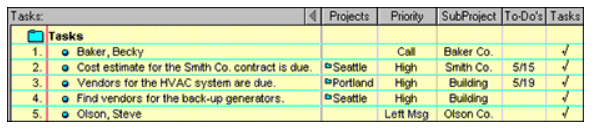
Ecco has a very powerful multifolder column feature that I use a lot. An example of it is shown in this post:
https://infoqubeim.com/drupal5/index.php/comment/22423#comment-22423
(Edited link)
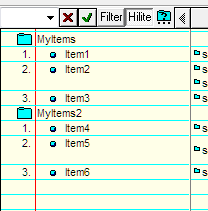
and this image:

I have searched the forum, but it is not clear to me if Ecco-like Multi-Folder view was implemented? If so, how would I do it?
Here is a simple example:

Can any options be applied universally (ie change one file; have it apply to all)?
I know it can be done for toolbar changes.
I recently changed the location of my backup folder. I couldn't find any way to make this option apply to all files (couldn't find anything in user manual). So I've been opening each file to change this option. This gets tedious pretty fast if you use multiples files.
Synching using dropbox -- adding dropbox / IQ to a new machine (or new OS install)
1. Synchronization between computers using Dropbox says to put the synced IQ file in the same location on the second machine as on the first (see A.3 at above link) -- this is not possible on machine #2 here -- is this a problem?
Also I was wondering would is itokay to use the IQ file directly from the dropbox folder?
I have mht files that I would like displayed in the document pane. Is that possible?
Alternatively, I can convert it to html, but I then get a small htm file and a folder with the rest of the files.
Can that be displayed in the document pane somehow?
I have tried with the sample and an empty database, but get the same error when I create a new grid:

p.s. I use v0.9.117j