Submitted by desbest on 2024/08/19 05:51 How about there being a new feature in the settings, that allows me to change the vertical padding for rows? Well definitely in pixels, obviously! Comments Hi ! Good suggestion. Right… Hi ! Good suggestion. Right now, the only way to increase the padding is to select the Document mode (Grid > Document - reading mode) I'll add it to the list Log in or register to post comments In v1.126Pre3: New: Grid:… In v1.126Pre3: New: Grid: Option to set the vertical padding. Separate settings for when cell wordwrap is On and Off (Tools > Options > Grid) Now available for download ! Log in or register to post comments Setting padding =0 still has… Setting padding =0 still has some padding. Any way to reduce it further so that the grid lines almost touches the text when set to 0?Also, it would be great if the padding could be set per Grid rather than globally. Log in or register to post comments To get the least padding,… To get the least padding, ensure that Wordwrap is turned off for all cells in your grid Log in or register to post comments Wordwrap = ON:Wordwrap=OFF … Wordwrap = ON:Wordwrap=OFF (all columns): It doesn't make any difference with wordwrap on or off.(and padding=0 in Options for both cases) Log in or register to post comments You need to turn off… You need to turn off horizontal grid lines to get a denser list Log in or register to post comments Log in or register to post comments Suggestions
Hi ! Good suggestion. Right… Hi ! Good suggestion. Right now, the only way to increase the padding is to select the Document mode (Grid > Document - reading mode) I'll add it to the list Log in or register to post comments
In v1.126Pre3: New: Grid:… In v1.126Pre3: New: Grid: Option to set the vertical padding. Separate settings for when cell wordwrap is On and Off (Tools > Options > Grid) Now available for download ! Log in or register to post comments
Setting padding =0 still has… Setting padding =0 still has some padding. Any way to reduce it further so that the grid lines almost touches the text when set to 0?Also, it would be great if the padding could be set per Grid rather than globally. Log in or register to post comments
To get the least padding,… To get the least padding, ensure that Wordwrap is turned off for all cells in your grid Log in or register to post comments
Wordwrap = ON:Wordwrap=OFF … Wordwrap = ON:Wordwrap=OFF (all columns): It doesn't make any difference with wordwrap on or off.(and padding=0 in Options for both cases) Log in or register to post comments
You need to turn off… You need to turn off horizontal grid lines to get a denser list Log in or register to post comments

Comments
Hi ! Good suggestion. Right…
Hi !
Good suggestion. Right now, the only way to increase the padding is to select the Document mode (Grid > Document - reading mode)
I'll add it to the list
In v1.126Pre3: New: Grid:…
In v1.126Pre3:
Now available for download !
Setting padding =0 still has…
Setting padding =0 still has some padding. Any way to reduce it further so that the grid lines almost touches the text when set to 0?
Also, it would be great if the padding could be set per Grid rather than globally.
To get the least padding,…
To get the least padding, ensure that Wordwrap is turned off for all cells in your grid
Wordwrap = ON:Wordwrap=OFF …
Wordwrap = ON:
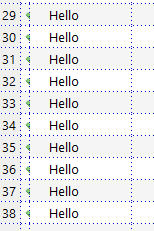
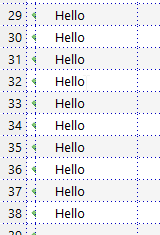
Wordwrap=OFF (all columns):
It doesn't make any difference with wordwrap on or off.
(and padding=0 in Options for both cases)
You need to turn off…
You need to turn off horizontal grid lines to get a denser list