Hi (been a while :-)
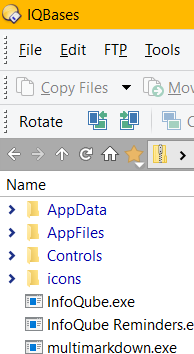
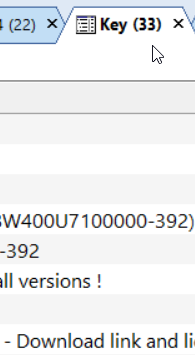
all the text in IQ is very blurry here -- including menus, tabs, items etc.
My display is 2560 x 1440 and is set to 125%. I dont have a problem with any other software I'm using at the moment.
I have cheked that grid zoom is at 100%
I do see some tips in Settings for best IQ experience
Recommends Sego UI Variable @ 12 or 13 point. I have Sego UI here, but cant see any variable option with it. I had it at 11 points --12 is not noticabely better and is already very big (in IQ at any rate) with these display settings.
This is obviously no priority, but does make the programme seem very dated (reminds me of windows 98 days ...)
Below file manager (Dopus) and IQ
General Discussion
Comments
Hi Tom (and welcome back!)…
Hi Tom (and welcome back!)
This is what I get (image zoomed 25% due to screen scaling):
Thanks Pierre for your…
Thanks Pierre for your replies (and help :thumbsup:)
Yes - your image looks blurry to me too (?!) I downloaded your image and viewed at 100% / "original size". It then looks better than here in the browser -- and it *might* be a bit better than mine -- but it's still not sharp. Downloading the two shots from the first post and comparing (with no zoom applied) should show you the difference clearly (but I'm not sure what happens if you looking with a different resolution).
It's very noticable here on a good quality (but not very expensive) screen -- especially as every other software looks very sharp here ...
I repeat this is ZERO priority. (And maybe someone else has a local solution?)
No problem for the zero…
No problem for the zero priority !
I have all 3 images visible at 100% and it isn't obvious which one is better. The one from Dopus seems to not use ClearType and/or not using the same font.
BTW my display is 2560x1600 at 125%
(1) yes, I'm on Windows 10 …
(1) yes, I'm on Windows 10
Solution:
Right-click on exe or shortcut to same:
select "troubleshoot compatability"
Answer the questions (troubleshoot again > "opens but doesnt display correctly" > "doesnt display correctly when scaling is used"
It applies the settings "scaling on high DPI"
maybe this is your (3) ? (Couldnt find anything searching "System Enhanced scaling" -- EDIT// sorry, thought this was a windows setting, see now it's an IQ setting
(2) changing font unnecessary
It's like day and night (disclaimer - on my system here :-)