
I just upgraded from v1.124.6 to v1.127.1 and got a new issue.
If I create a new item, with a doc pane, I can paste items into the doc pane. I can also insert a date/time stamp.
However, if I navigate away and back to this item, I can no longer perform a paste or insert a date/time stamp.
If I try to copy/paste from Notepad, nothing happens; If I try to copy/paste from another doc pane, I get the popup asking what format to paste, but then nothing is pasted (e.g after selecting plain text).
I also happens in a new blank database.
I went back to v1.124.6 and I can copy/paste again.
Any idea on how to troubleshoot this?
EDIT: I also cannot select text in the doc pane by dragging the mouse cursor backwards. Forward drag works most of the time.
Bug reports
Comments
Hi viking, re paste: Are you…
Hi viking,
re paste: Are you sure that you are in Edit mode?
re select backwards: works here
Yes, I was in edit mode; e.g…
Yes, I was in edit mode; e.g. I was able to type. This morning the doc pane started to work. Not sure why it didn't work yesterday after upgrading.
I haven't rebooted the PC, only sleep. However, I opened/closed IQ several time. I had tried restarting IQ yesterday, but it didn't help then.
I will post here again if the issue starts again.
It only worked for 5 min 😒…
It only worked for 5 min 😒. I rebooted the PC, but it didn't help. Not sure how to troubleshoot this weird behavior?
p.s. Probably not related, but the new version changed the tab look on overlapping panes ("subpanes"). I remember that they also looked like this several versions ago:
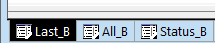
EDIT: I copied IQ portable to a new, empty folder and run IQ from there. The problem is gone. Thus, there must be some corruption of some file(s) in my Users directory. I guess that I will need to copy files one by one from my regular Users directory to the new Users directory and see when the problem occurs again?
EDIT 2: It appears that the "NewHTML.HTM" file was corrupt. The file in my working directory was 100 bytes; the new one is 107 bytes. I replaced the 100 bytes one with the 107 bytes one in my working directory and I can now copy/paste again. Hopefully it will last....
I wonder how it got corrupted? In MS Word, they are both blank (except for a single space character in both).
open the files in Notepad…
open the files in Notepad instead !
Yes, of course..:Old …
Yes, of course..:
Old "Problem" file
<!DOCTYPE html>
<HTML><HEAD><META charset=UTF-8></HEAD>
<BODY>
<p> <p>
</BODY>
</HTML>
New "OK" file:
<HTML><HEAD><META charset=UTF-8></HEAD>
<BODY style="OVERFLOW: auto">
<p> </p>
</BODY>
</HTML>
It appears that the new IQ version requires the "OK" file with <BODY style="OVERFLOW: auto">?