Sad to say, I haven't been able to work in Infoqube much lately. I sorely miss being able to use IQ at my job, but I am not permitted to use any software but what they have approved. They even rejected my request to use a simple "Tab Renamer" extension for my browser. It's hopeless to ask permission to use anything but what's on the "approved list".
So, for outlining, I'm using Microsoft Word constantly. For outlining, it's a pretty miserable experience. Half the time, the Alt+Shift+arrow keystrokes for promoting / demoting / moving items flat out don't even work. Even worse, having to work in Word and Excel all day is making me forget my Infoqube skills and keystrokes.
Trying to refresh my old IQ outlining skills, I made an "outline-test" grid and put a few items in it, just to remember how easy and intuitive it was to move around with keystrokes. BUT for some reason my grid is not showing my outline levels! Look at this screenshot:
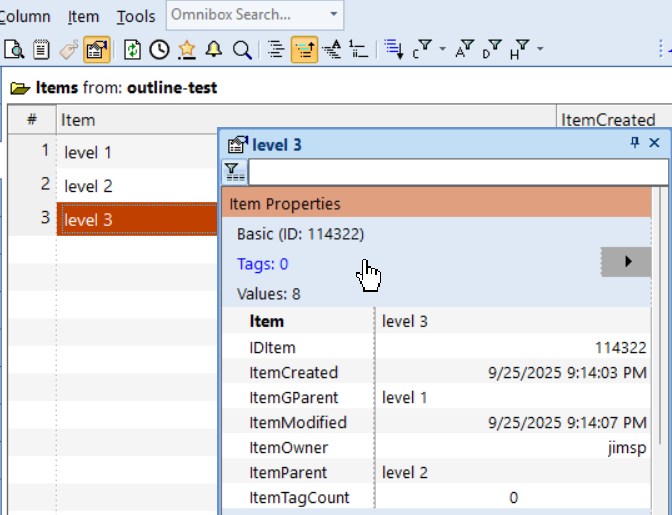
Looking at the Values section of the Properties pane, you can see that item "Level 1" is the grandparent, "Level 2" is the parent, and "Level 3" is this child. But these three items are not properly indented in the grid to show these relationships. Moreover, Alt+arrow is not promoting/demoting/moving these items as it should. But if I go to another grid, the parent-child relationships are properly shown, and Alt+arrow does work. My Grid > Display Mode setting is "Outline (Normal)".
Any idea what's going on here?
Comments
Hi Jim, Sad to hear when…
Hi Jim,
Sad to hear when organizations are so "closed minded". The portable version should run anywhere, but I guess you don't want to take the chance of getting caught. Remote desktop into home is an option perhaps...
As to your grid, I have no idea what could be causing this...
HTH !
Pierre_Admin
IQ Designer
Hi Pierre, thanks for your…
Hi Pierre, thanks for your suggestions - I made a new grid, named outline-test-2, with the existing outline-test field as source.
Here it is:
Again Grid > Display Mode is set to Outline (Normal). ItemParent and ItemGParent values are as they should be, and Parent for "level 3" item is properly shown as "level 2", in bold. And still, the proper indentation is not shown for the three items in the grid. As before, alt-arrow does not work! As you can see, item "Level 3" does not have "outline-level-2" set to yes - only "level 1" has that set. And when the grid opened, only "level 1" was shown. When the "outline-test-2" grid first opened, only "level 1" was shown. I think I used ctrl+arrow to show the other two items, but they were not shown as indented. I just closed and reopened the "outline-test-2" grid, and all three items were shown, but again, not properly indented, and again, alt-arrow not working.
In other grids, indentation is correct, and alt-arrow does work.
Very odd!
jim
And if you add items in this…
And if you add items in this new grid, can you get some hierarchy of items?
Did you try Database > Repair
I just added some items to…
I just added some items to this new grid outline-test-2, but when I did, I could not demote/indent them. I haven't done the Database > Repair yet, but I will, and I will report back. (In addition to trying keystorke alt+right, I also tried Item > Move > Move Right - that didn't work either.)
jim
This now appears to happen…
This now appears to happen in all databases, now that I have updated to the latest version (patron version)! All new grids have the precise problem described above, but any already-existing grids show normal indentation. If I create a new database, the built-in grids are normal but any user-created grids have the problem. I'll try reverting to the previous version for now...
UPDATE: I was able to download version 128.0Pre2, but it seems to have the same problem. But I'm now running 127.1 (from the main downloads page), and everything is back to normal.
Hi Jim and Lucas, I was able…
Hi Jim and Lucas,
I was able to reproduce it. The issue is the new setting for tree indent (requested by WayneK). It is set to 0 by default. You can change it back to something else in Grid properties.
I'll issue a fix ASAP
Hi Pierre, I went into…
Hi Pierre, I went into Manage Grids and set the Tree Indent value to -1 (default) for both of my "outline-test" grids. As soon as I set this value, the proper indentation levels of parent and child items was displayed. The Alt+arrow and Ctrl+arrow keys started working after I refreshed these grids. Thanks for tracking down this problem!