I have fields set up to auto-assign formatting. For example, checking the field "F-BLtY" applies bold formatting with light yellow fill color. This auto-assign field is working correctly:

I want to set these up in a new file. I figured I'd just copy what I did previously.
But I can't do that because all the auto-assign settings are missing from the field dialogues. Why are the settings gone and how can it be working if the field is not set up for auto-assign? The entire properties panel is blank:
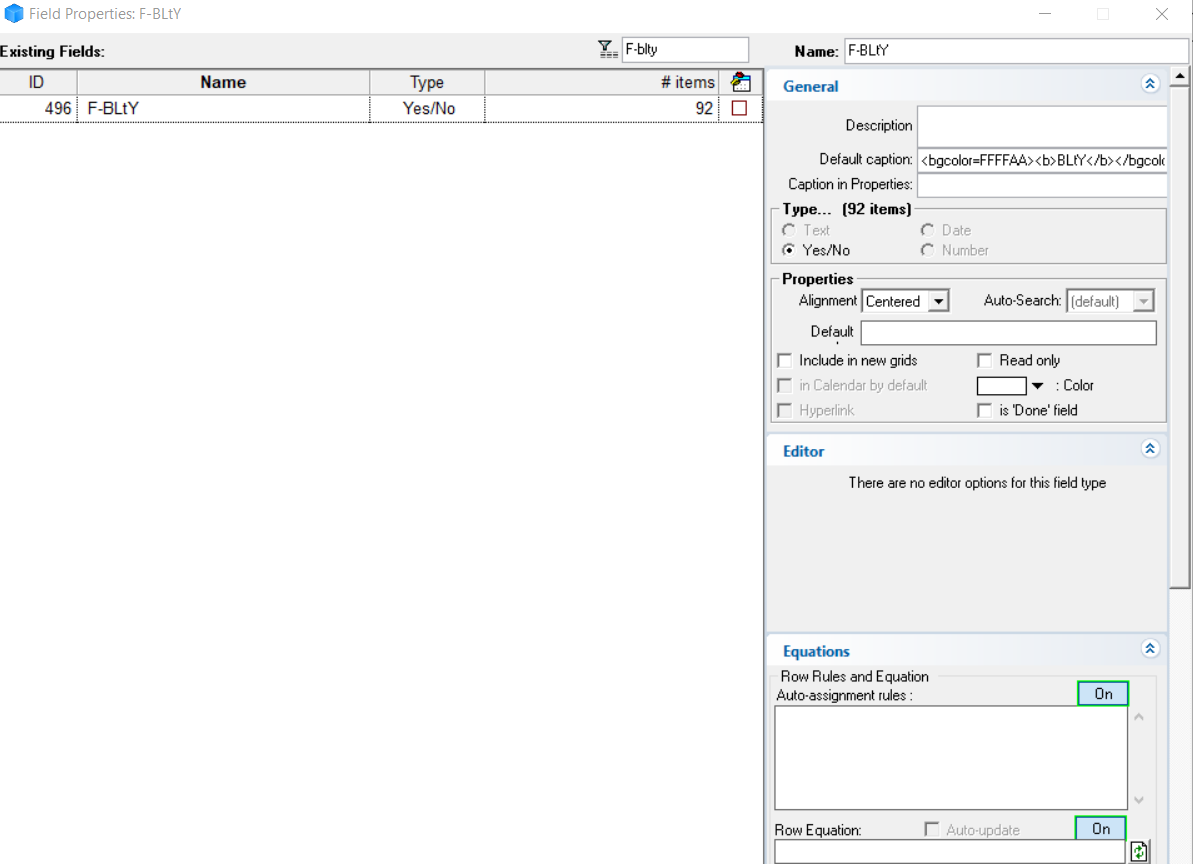
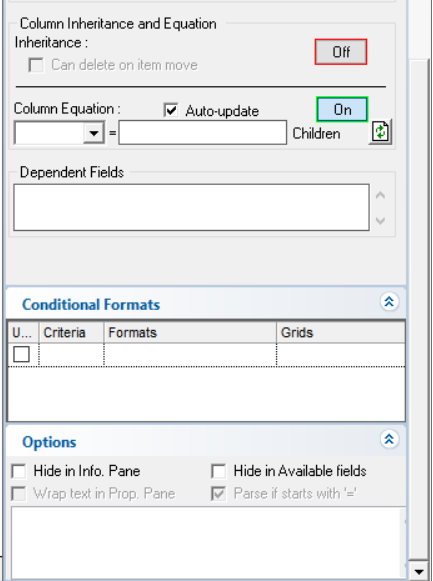
I thought I could accomplish the same thing by copying the field values but it appears you can only transfer these within a file, not between files.
How do I ?
Comments
Hi Wayne, It is odd that you…
Hi Wayne,
It is odd that you don't see the field properties correctly. Did you try to restart IQ? Repair your file?
Easier than copying parts of a field, did you know that you can right-click on a field and select Copy. Then in the other file, in the Field Properties dialog, right-click and select Paste Field. A new field will be created and listed at the end of the list
HTH !
Re-starting files and…
Re-starting files and rebooting computer didn't do anything. Both repair and rebuild lock up when I try to run. The screen turns white and I get "(not responding)". The rebuild did create a new file but that locks up when I try to open it.
I opened a file from last year and field properties are missing there, too.
"Copy field values" to field in the other file didn't work. It seemed to paste the values but the properties pane is blank just like the original. It also doesn't work (doesn't apply formatting). unlike the original field, which is also blank but does apply formatting somehow.
Hi Wayne, Clearly there is…
Hi Wayne,
Clearly there is something wrong with that file. Try this:
If there are issues with the masked copy, you can submit it to us for review
Pierre_Admin
Pierre, We went through all…
Pierre,
We went through all those steps before. You weren't able to find anything wrong. I have a rotating set of misbehaviors that come and go. They can't be reproduced and we couldn't figure out what's causing them. My guess is that the program is starved for memory at times. I have noticed that some things can be resolved by closing my Firefox browser. I have 16 GB of memory and my memory usage is usually running around 50%. If it gets higher, I reboot.
I'll be getting a new computer in the next few months, and am hoping that might clear some things up.
You don't have to do anything further on the auto-assign issue. I'm creating new ones. I needed to refresh my memory on how they work anyway.
Wayne
Understood It is however not…
Understood
It is however not a good idea to use an IQBase that is in such a bad database state. You never know when it will become unusable. Thank (or curse) MS for having build a database engine that still "mostly" work even when there apparently is some corruption.
We can (and should) work together to get all your content into a new IQBase
A long time ago I asked if I…
A long time ago I asked if I should look at starting a new database but didn't get a reply. The problems appear in both files I use regularly. Don't know if they occur in older, smaller files that I haven't been using lately.
The last time I copied to a new database it took many days to accomplish and the file is much larger now.
Let me know how I should proceed. I'm going to lose all my settings, all my toolbars, all my fields? This will take weeks of full-time work to pull this off. Is there any way to shortcut the process?
Hi Wayne, You would not…
Hi Wayne,
You would not loose anything. The idea is that the rebuild must be "fixed" so it works for your files
OK. How do we proceed?
OK. How do we proceed?
We can do this live (Google…
We can do this live (Google Meet) or else you can send a masked copy
I'll send masked databases …
I'll send masked databases (two of them). When is the best day for you to do this? Would Monday be better so you have the work week ahead vs right before the weekend?
either way is fine with me !
either way is fine with me !
I just emailed you links to…
I just emailed you links to two masked files.
Wayne