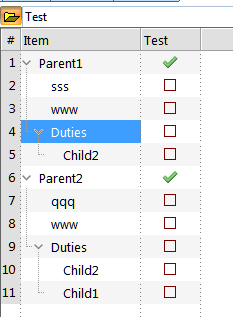
Only Show Children That Meet the Grid Source?
I have read the book page on Display Modes.
I have these items, currently shown in Outline (normal) display mode:
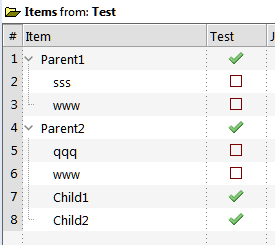
I have read the book page on Display Modes.
I have these items, currently shown in Outline (normal) display mode:
Is it possible to freeze a column within a grid so that it's value remains static whilst other columns are sorted.
Would be very useful for several applications
Win 10
Ver 121pre8
I just recently stared working with multiple IQ databases.
I now notice the IQ icon on the taskbar does not show recently used items in a jump list (right click)
I have Jump lists turned on and use them for several other programs.
Can IQ Icon use jump lists?
Following up on the previous discussion regarding adding hyperlink to the URL field here: https://infoqubeim.com/drupal5/comment/26218#comment-26218.
I tried Firefox and Chrome (I don't use Edge) but the URL field is not populated (except for once). I even tried with a blank database.
I have a column of data that is dollar values, and I want a sum of that column. How do I write a formula to give that sum? And where do I place the formula?
Sorry for trivial question, but I am not sure why this source filter is not working:
#Done_B = null
I want to hide all items that have the Tag #Done_B set. However, all items are hidden with it on.
When I copy/paste from Ecco Pro into InfoQube, the text often gets indented to the center of the page.
Is there a way to prevent this without going thru a full-blown import routine?
Wayne
Win 10 - 121Pre3
When I sync Google Tasks to IQ, they are automatically synced to the DueDate field, and hence they appear in the color set for that field.
Is there any way I can change the color of these tasks in IQ (or, perhaps, sync them with some other date field), so they will look different on my IQ from other items which have a DueDate field (mainly my IQ reminders)?
Thanks!
I am repeatedly getting this error message:
Field FileFullName is slow to computer (took 4280 mSec) which affects UI responsiveness. Consider hiding it in the Properties pane. (Manage fields>Options>Check both checkboxes for "Hide in xxx').
Both boxes are already checked. What can I do to make this stop popping up?
Wayne
I expected this has been asked before but I could not locate an answer.
Q. Is it possible (even on a limited basis) to edit the popup context menus. What I want to do is (possible) first hide some options and then rearrange the remaining to streamline my system.
Being able to have just my most used selections and in the order I use them on the menus would be absolutely outstanding.
Any thoughts?