HTML Pane Settings
- Read more about HTML Pane Settings
- 1 comment
- Log in or register to post comments
I really love the capabilities of the Document / HTML pane. I use the Nimbus Clipper to do most of my web page captures (it's Capture Fragments capability is awesome) and pasting directly in IQ works beautifully. The one feature that I find lacking is the ability to quickly resize captured Images. Rather than having to use the mouse to manually resize each Image, I would appreciate the ability to right-click and select a desired pixel width or size %. I like to keep the images as small as possible but need to quickly expand them as required.
I have a similar suggestion for importing Image Files. When selecting the HTML Pane as the Link Storage, there could also be a default Width setting which would simply add the "width=xxx" directive to the <img> tag.
Thanks for your consideration.
Version: 0.9.109f
Used Drag & Drop to import Image files (jpg, png, gif) into an Assets grid with the following Linkage settings:
#1 : Minor : Import allocates Grid Row Height based on the size of the Image; F5 Refresh fixes this so hyperlinks show as standard text rows.
#2 : Medium : Fully Erasing the Grid Rows does NOT remove the .lnk files from the SNDB.Files folder.
#3 : Major : Inconsistent execution of hyperlinks calling default Image Viewer. Clicking the hyperlinks for the newly imported Grid Rows usually calls my default image view (IrfanView) the first time. Subsequent clicks are less consistent. Selecting a Grid Row by clicking on the # column causes the hyperlink to no longer function. The images still show up as expected in the Document Pane. Double-clicking does nothing.
Just planting a seed for your contemplation when working on Calendar features...
Items in the Calendar use Item-specific Properties to determine the display of the Item in the Calendar; ItemColor for the Fill and ItemForeColor for the Text Color. On the other hand, the color of the BORDER around the Item is determined by the COLOR associated with the DATE Field linking the Item to the Calendar. To have 5 distinct Border Colors, there has to be 5 defined Date Fields and data entry requires the user to determine which Field gets the Date info.
Adding a Field Property like ItemBorderColor (which could DEFAULT to the Date Field Color to mimic the current behavior) would be a more flexible solution.
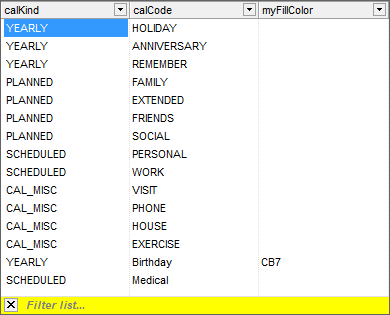
SELECT pickKind as calKind,pickCode as calCode, pickColor as myFillColor
from PICKLIST WHERE pickType = "CALENDAR" AND pickCode <> ""
ORDER BY pickKind, pickCode
but the resulting selection list is still somewhat jumbled.

SELECT pickCode as calCode, pickColor as ItemColor from PICKLIST SELECT pickCode as calCode, pickColor as myFillColor from PICKLIST