Reminders bells showing for events without reminders
Thank you very much for v120Pre7!
I've been experimenting with making more use of Surface view, and I've been finding it very useful.
The only issue I've been having is that, when I have Surface open, IQ runs into some minor issues. Specifically, when I click on menus, the item under the mouse doesn't highlight (although it can still select items using up/down arrow keys). And sometimes, if I have more large grids open, clicking on a menu just flashes its contents and then the menu closes right away. (Could this be related to using a large monitor that makes IQ have to work too hard to create Surface layout?)
I continue to have problems editing text.
1) Item is selected but I cannot enter edit mode. Double-clicking or space bar doesn't work.
2) Edit mode has been entered (selection color has changed to white) but cursor will not show up in the text.
3) Edit mode has been entered and cursor has appeared but I cannot type text and cannot move cursor with the arrow keys.
In all cases, the freeze-up is removed by selecting another item and returning to the first. I cannot reproduce any of the above.
I can reproduce the following:
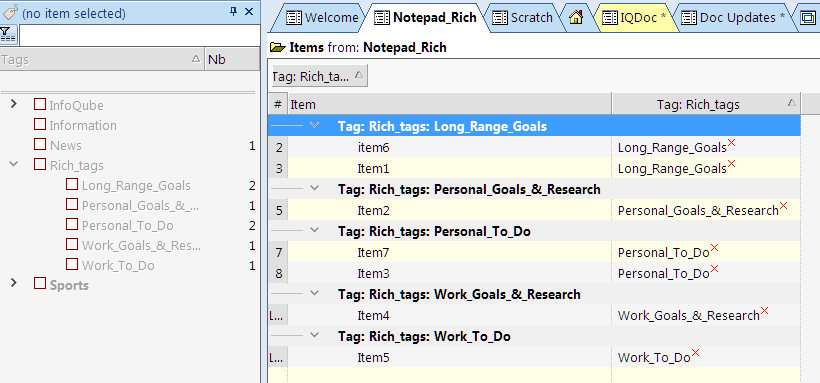
Bullet labels disappear when grouping Tags

This is new behaviour, started a few weeks ago. When I create a new item using ENTER and start typing, then the first letter I type ends up at the end, e.g. I want to type "Hello" and I get "elloH". It doesn't happen all the time, but is more likely when I type quickly. It seems as if the interface isn't fast enough to add the new item and put the cursor at the beginning of the line, so it puts the cursor at the beginning of the line after I have typed the first letter.
1.217 ("Show a box around the tree column for selected items") does not seem to work for items that have their background color set via conditional formatting rules (box isn't shown on top?).
Cheers!
In v120Pre5 as well as the previous version (at least), creating links via [[ doesn't create Related Items links, even when that option is selected. I tried with a clean setup of the portable version and the problem persisted.
This has been present in the last few InfoQube releases. I can reproduce it on two computers, but I share a configuration between them, so it could be related to my particular options. While typing in the Document Pane, there is a momentary lag after typing the character 'I' (capital "eye") after which a space will not register. If I press the spacebar twice it will add the space.
Recommended workaround if there are others affected is to avoid writing in the first person.
When I try to add an event in the IQ calendar in Pre4, it doesn't appear in the calendar, even though searching for the event finds it under "Home".
This problem does not exist in Pre3, where adding calendar events displays them correctly - FYI.
Thanks!
Perhaps something has changed since the recent adjustments to splitting functionality? I am repeatedly seeing the manual sort order of items changing in totally unexpected ways after splitting sub-items. I will try to come up with an exact recipe to recreate this, but in the meantime I'm curious whether others have seen this and whether there is a potential explanation for why splitting sub-items would change the sort order.