possible date bug

Submitted by jan_rifkinson on 2009/11/16 16:44
Situation:
 
Every day I keep a log of activities
I sort by date & view 7 days at a time
 
sometimes on mondays I take notes & then close IQ
When I re-open IQ, my monday notes have 'vanished' from the grid
 
Actually they haven't gone anywhere
 
Workaround:
 
I have to click today /  refresh & they appear
I don't understand why this has to be a manual function
I would think that IQ would know what date it is, i.e. today
 
--
Jan Rifkinson
Ridgefield CT USA

Addkeyword and RemoveKeyword functions don't work as expected anymore...

Submitted by Armando on 2009/11/14 01:53
All my equations + autoassignment using these functions don't work anymore...
:(
 
 
e.g. : the functions leave some "-1" and "0" in the text fields everytime I use them (instead of empty field or just the text that's supposed to be there...)
 
I have some -1 and 0 in many places in the DB now...


Copy/paste improvement : to be able to copy only portions of hierarchies -- not the entire tree. <SOLVED>

Submitted by Armando on 2009/11/13 13:07
I've been keeping that one on the backburner for a while, but I think it needs to be fixed ASAP.
 
1- Problem with full tree copying ("Selected items and their sub-items -- In XML format, to make an exact copy of the items and ail their sub-items and paste It in an IQBase)
 
--> when there's recursion in the tree there's no end to the copying process. Processor is at 100% and one needs to close IQ.


2 - Can't copy/paste selected items while preserving the hierarchy.
 
--> let's say I just want to copy some "finance" items of a tree containing all kinds of other info and preserve the hierarchical info.

Copy item (XML) between files not working properly

Submitted by Tom on 2009/11/12 07:46
this looks is a bug (couldnt find it here)
 
2 files open simultaneously
  • Copy (XML) item in one file
  • If I paste as sub-item in the other file - i.e. down the hierarchy a bit, everything shifts up the grid a bit (disconcerting) but no item pasted & no dialogue box
    (I did a search as well - item was not created)
  • I pasted it at top level - first few attempts it didnt work, then it did work creating new item (again no dialogue box shows but that more logical here as I guess the only choice is to paste it in the grid)

Exporting / Importing single grid from Ecco -> IQ

Submitted by jan_rifkinson on 2009/11/11 19:15
I've been reading some of the threads on this but have some questions:
 
On the Ecco side it looks like I'd have to do an export of TLI + children
Is tab delimited preferred over comma -- there was a thread about a problem w comma
 
On the import side, I guess I'm only importing 2 fields: # + item
 
Does it make more sense to create a blank file w a new ecco grid + automated ecco field to import?
 
Thanks
 
--
Jan Rifkinson
Ridgefield CT USA


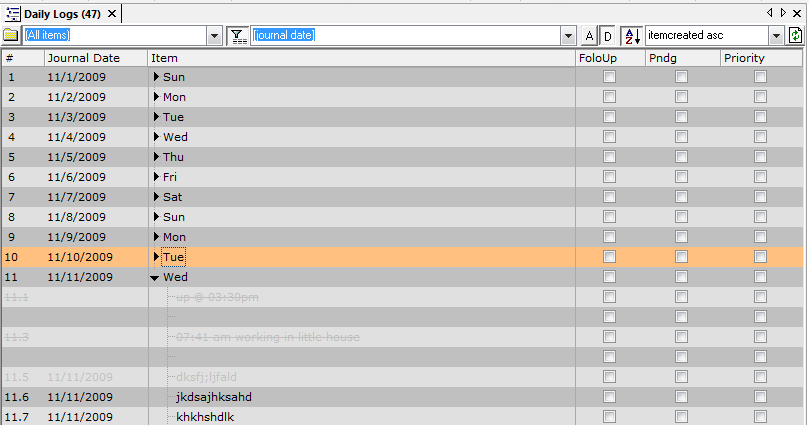
Plse take a look @ Journal grid & diagnose problem <SOLVED>

Submitted by jan_rifkinson on 2009/11/11 08:25
This was set up to work in the following manner
 
Column 2 = Journal Date (input manually, i.e. does not = now)
Column 3 = item w subitems
 
This worked ok until today when I noticed that for each new sub-item, the journal date was being inserted automatically.
I can't figure out why.
 
 
Thanks for any help solving this mystery.
 
--
Jan Rifkinson
Ridgefield CT USA


File Link: change FileName in properties -> FilePath is deleted

Submitted by Tom on 2009/11/10 11:54
Drag drop file to IQ:-
 
In the Properties pane of the linked file/item:
change the FileName field in any way (Edit / Paste new name in)
press return
->
The FilePath field content is deleted. This happens when I change file name via Filled fields, via a Form, or via Available fields.  I have to re-add the path manually
 
Can anyone confirm this ?
(happens every time here so seems a pretty definite bug)