Ctrl-C no longer copies the focused item's text from grid (since Pre3)
Dunno if it's just a question of re-configuring a shortcut that was removed in the update but I suspect most users will want it back as the default behaviour.
Cheers
Dunno if it's just a question of re-configuring a shortcut that was removed in the update but I suspect most users will want it back as the default behaviour.
Cheers
Per instructions here: https://infoqubeim.com/drupal5/node/321
I then selected "Yes, set it visible to other applications"
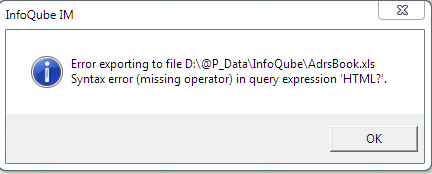
I get an error:

After restarting IQ, upon hitting enter for the first search from the Omnibox ('Search entire file'), unless Live-Search was the last selected grid in the previous session or it was the focused grid at least once before I do the first search, the ShownIn column for the upcoming Live-Search results is not populated with values. I have to re-focus the Omnibox to press Enter a second time to get the same results but with actual values in that column.
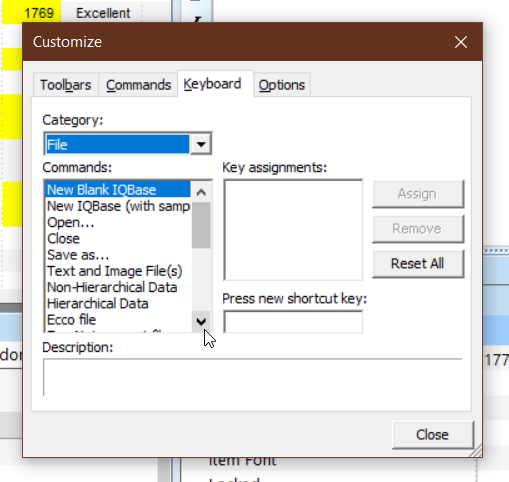
Open Customise dialogue and go to Keyboard tab:

Press the arrows above and below the scrollbar -- you will probably have to click each twice to get it to work. These work untypically in that they go straight to the bottom or top of the list (this the first part of the bug and causes the second part).
I can create a new Pop-Up List Field in v.117jPortable. However, in the current v.118j and v.118g, I don't have the option to select this in the Editor Drop-Down. I can only select "Text Box" :

I really like the Group by Bar feature (it works like Ecco's multi-folder View).
If I group using a Field column, the grouping is persistent after a refresh (F5).
However, if I group using a Tag column, the grouping is lost after a refresh (F5).
I tried to link a file by dropping into an empty Grid. I got this dialogue:

However, the item initially doesn't show in the grid:
Not sure if this a known issue - or even intentional? - but when I close IQ with an active filter, on re-opening the filter is remembered and still active for the grid. On disabling the filter, the manual order of the grid from before restarting IQ is lost and items appear ordered by creation timestamp or something. I don't think the intended order can still be recalled in such cases. Thanks!
I created a new toolbar and added some commands to it. Everything works as expected.
However, after I close and reopen IQ, the toolbar is gone. It is reproducible.
Is it a bug or do I somehow need to save it before closing IQ?
v.118g on WIN7
I tried to move my ToDo Column be the next to last column. When done it was instead put last. Here is a movie: