other outliner discussion forums?

Submitted by jimspoon on 2019/09/18 11:55
Hi all, does anybody know of other good forums for general "outliner" discussion, not focused on a particular program?  Of course it is possible to post "general" discussion in a "program specific" forum, but then you don't want to muck up the forum for "program specific" users.  For example, I'm sure nobody would want our "What's New" page to be cluttered with posts not related to Infoqube.  I've posted in OutlinerSoftware for years but it is woefully deficient, especially compared to what Pierre has here.  No image support for screenshots, no formatting support, just plain text.  Proposed improvements were never implemented.

Please help - can't delete only from a certain grid anymore

Submitted by LeftEccoForIQ on 2019/09/16 11:53
After fiddling with equations for my main Action grid, the delete dialog now offers only complete deletion, not 'remove from this grid only' anymore. It works fine in other grids, but has ceased to work for this particular grid. I have to manipulate values in the properties grid and manually update the grid to achieve what the delete dialog did before. Thanks for helping me out.

Sorting Question

Submitted by David_H on 2019/09/16 01:15
I like to be able to sort by column, which is easy by clicking on any column header. But the problem is that the moment I close a grid, the next time I go back to it, it is always sorted by number/order created.
 
I can solve this by dragging a column header to the sort area, then it keeps it sorted even after it is closed, but that disables the ability to click on other columns to sort by those.
 
I am sure there is a way around this catch 22, but I am not sure what it is? I have also tried going to the grid settings and entering "item" in the sort box, which is what I usually want to sort by, and which i assumed might then make it unnecessary to drag up to the sort bar, thereby solving the issue. But that setting is not doing anything for me.
 
I am being lazy right now as I have not yet checked the documentation, which i will do tomorrow when I wake up if no one has answered :-).

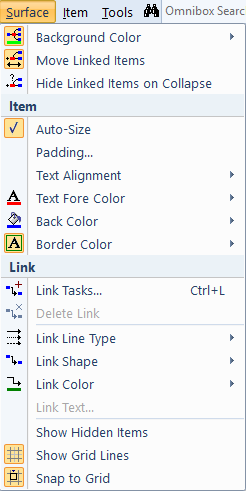
Surface Menu

Main documentation page: 3. IQ Surface
 
 
  • Background Color: Surface background color
  • Move Linked Items: If checked, linked items move as a group
  • Hide Linked Items on Collapse: Sub-items always hide when collapsing items. This controls if linked items also collapse
Item
  • Auto-Size: If unchecked, item can be resized
  • Padding: When Auto-Size is On, sets the padding around the text
  • Text Alignment: Select from a list
  • Text Fore Color: Uses the ItemForeColor field
  • Back Color: Uses the ItemColor field
  • Border Color: Item box border color.

Drag links stopped working

Submitted by WayneK on 2019/09/15 10:29
I capture links by:
 
1) Select icon in Firefox address box
2) Left-click drag to InfoQube window
 
This stopped working yesterday.  When I drag the link, instead of getting a red line indicator in the target grid, I get a "no" symbol (circle with crossbar).
 
I hadn't made any changes to InfoQube or Firefox when the problem appeared.  The InfoQube addon is active in Firefox.
 
Just upgraded 9.113f to 114b and the problem is still there.
 
Wayne
Win7 64 bit
114b

Parent items and the calendar

Submitted by LeftEccoForIQ on 2019/09/15 08:20
When I remove parent items from other grids so that they are only assigned to one date field (e.g. Appointments), I usually only come across them in the calendar. However, there is no indication in the calendar that these items have children. I can use the properties pane to check for existing children, of course, but I'd find a visual clue in the calendar (to remind me that there is additional info in the form of children attached to these items) quite useful. (Similar to the one now used for recurring events).
 
Of couse, it would be even greater to somehow be able to view these children directly through the calendar interface...
 
Cheers!