How do I assign a hotkey to a checkbox (yes/no) field?

Submitted by winter on 2010/09/16 12:19
I am sure this a "newbie" question, but I can't seem to make it out of newbie status. 
 
I have a field called "Stop" which enters the date in another field, i.e. Autoassign rule is TaskActEnd=now.
I would like to have a hotkey check the box instead of having to do it with the mouse.
 
I have another question regarding this same issue which I'll post as another topic.
 
Thanks in advance,
Winter

Request re moving item using # column

Submitted by Tom on 2010/09/15 15:27
 
Currently you can select an item by clicking in the # column
To move it using the # column (via Click and drag) you have to click on the actual number
 
 
Could this be simplified to the following (?)
-------------------------------------------------------------------------
Click and drag from anywhere in the # column will move an item
-------------------------------------------------------------------------
 
I can see this might not be possible but it would simplify things quite a bit if possible
 

Locked items

Submitted by Jon on 2010/09/15 08:35
Is this working in 25a? I know I had asked before about the way an item can be locked (I like the way it is implemented under Ecco Pro using Ecco Extension).  My view is that it should protect the item from changes and from being moved, but others found this problematic. However in 25a the commmand seems to do nothing.
 
Jon

Cannot hide field in grid via Displayed Column window

Submitted by vortsg on 2010/09/14 15:38
I receive an error when attempting to hide a field currently displayed in a grid.  The method I used to produce the error was to open the Displayed Columns dialog box.  Then I unchecked the field I wanted to hide.  When clicking OK to close the dialog box I get a Visual Studio error and the application shuts down.
 
I can hide columns by right-clicking the column header and selecting hide.
 
vortsg

Columns mixed up

Submitted by vortsg on 2010/09/14 15:30
I had an interesting incident today when I moved to the 0.9.25a final.  Two fields that I was using appear to have switched.
 
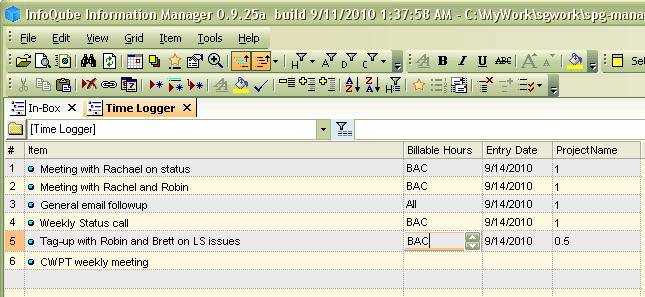
In the image below, the fields Billable Hours and ProjectName are reversed in that the data for one column is under the column header for the other.  The field named Billable Hours is a number field and as you can see by the field being edited it has the up/down arrows to increment the value.  The ProjectName field is a text field with a picklist option.


I am trying to see how to correct this as.  I noticed this when I was attempting to rearrange the column order on the grid via dragging a column header name.  It is almost as if it moved the column header, but not the data in the col