Create a user defined ordered hierarchy with no sorts whatsoever

Submitted by cnewtonne on 2010/09/06 12:30
I have, over the years, developed a very significant body of knowledge using listpro. it is mostly technical procedures created in what is known as 'ordered lists' using this software. Under no circumstances, the sort is altered by any other implicit or native application sort functionality.
 
I created a grid with IC using xml/opml imports of 1500 rows as a hierarchy. The native behavior I saw was not encouraging. I moved a row for a test using alt+arrows keys. When I click F5, the row got moved automatically. Repeating this move/refresh procedure did the same thing. the moved row did not stay where I wanted it.
 
Also, I have noticed that what I saw on the grid as I was moving rows and rearranging the hierarchy, even though appeared to be working as I wanted, hitting F5 showed a different story. Updates made to row text were not reflecting, sort ordered changed, and rows appearing to in different place in the hierarchy.
How can I cause a date and time to be entered in a field when I exit an item?

Submitted by winter on 2010/09/05 14:41
Thanks in advance for any help.
 
What I would like to do is have the field TaskActEnd contain the current date and time when I exit the Item, whether this be by creating a new Item, switching grids, or whatever.
 
For TaskActStart it was simple to have the time entered automatically: TaskActStart=ItemCreated as an autoassign rule.
 
It's not clear to me what hoops I need to jump through to have any value, not necessarily just this one, be assigned or calculated automatically when I stop entering data in one Item and move on.
 
I have a lurking sensation that the answer is in front of my nose, but I don't see it. Any and all help greatly appreciated!
 
Regards,
Winter

Imports completes successfully, but no items are shown anywhere!!!

Submitted by cnewtonne on 2010/09/05 11:11
I have a simple tab delimited file with 9 records. The file gets parsed fine as I can see it in the wizard. I map 2 fields only to 'item' and 'duedate'. The wizard tells me that 9 records are imported successfully. I go to the grid and show these 2 columns, but I see nothing even after refreshing it.
I reviewed the import docs and this forum to no avail.
 
Any ideas?
 
Thank you.


Dock to tab:

--
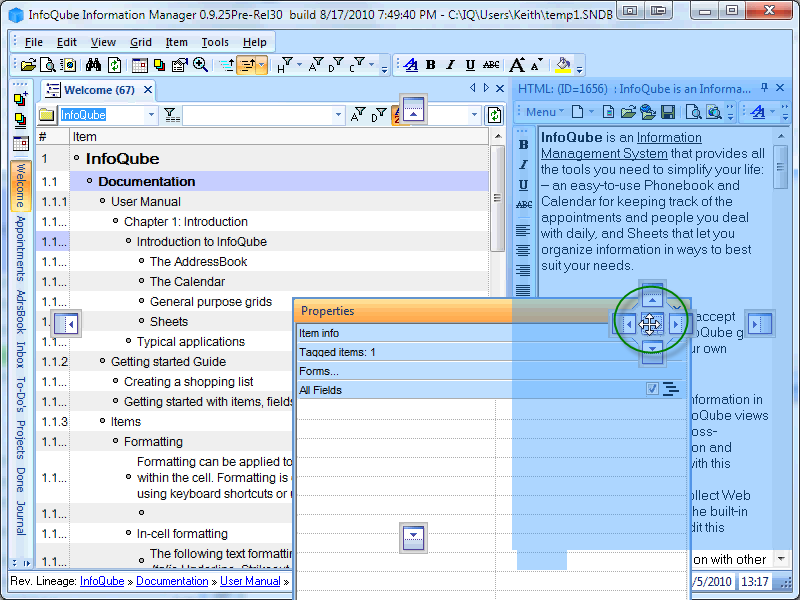
Now drag the Properties pane to the center section of the group of boxes as shown, and note the highlighting encompasses the entire HTML pane:
--
--
Notice the Properties pane fills the HTML pane area, and is the currently shown pane.

 InfoQube can be set up to run natively on Linux via the WINE compatibility layer.  This document describes the set up required to enable InfoQube to run successfully on Linux.

Note: This is a work in progress.  Currently IQ is not running on Linux via WINE following these direction - but we are close.  Any assistance would be appreciated.

Linux Requirements

Linux requires various applications and libraries to be installed in order for InfoQube to work properly.  Ensure the following Linux applications and libraries are installed on your system.
  • Fresh wine install (v1.2 or higher)
  • install cabextract
  • install unzip (usually installed by default with the operating system)
  • install samba
  • install samba-common (normally installed along with samba)
  • install samba-winbind

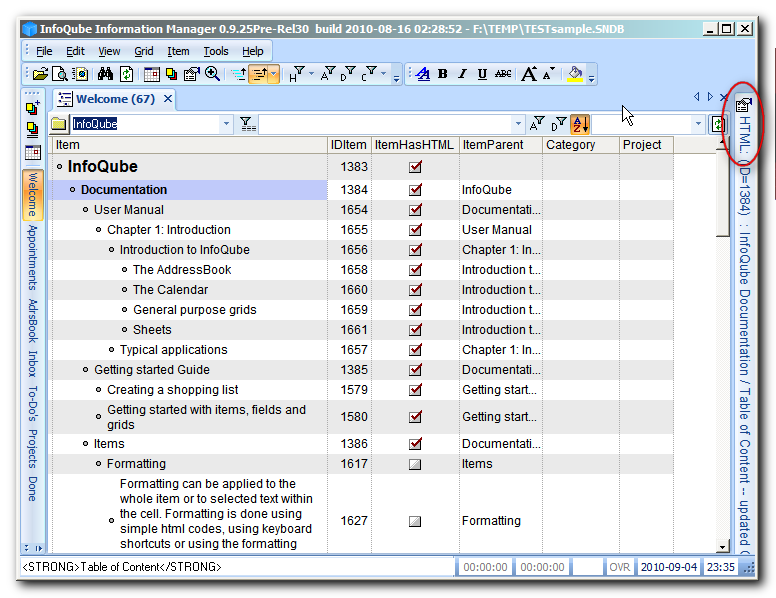
Autohide problem with HTML pane title (too long)

Submitted by Tom on 2010/09/04 18:22
 
Clean install, default sample file:
  • In welcome grid, select the second item 'Documentation'
  • Show Properties & HTML panes
  • Autohide HTML pane
  • Autohide Properties pane
  • Both panes autohide with the HTML pane above as it was hidden first
the problem is that the text on the autohidden HTML is so long that you are unable to even see the autohidden Properties pane unless you are using full window or have a very big screen.
 
 
Properties pane is also autohidden in this window but is not visible here....
 
( related to work for the manual page: 6) Pane Autohide (node 1915) )
 
 
EDIT

Move a pane into a docked position:

 
In this example, a pane presently docked to the right-hand side will be docked at the bottom.
This could similarly be done with a pane that is floating.
--
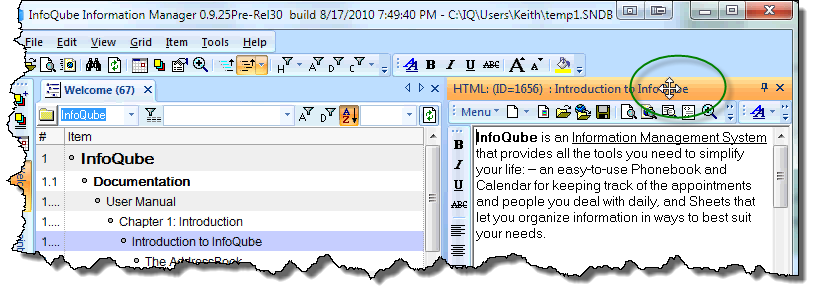
Select the HTML pane:
-
--
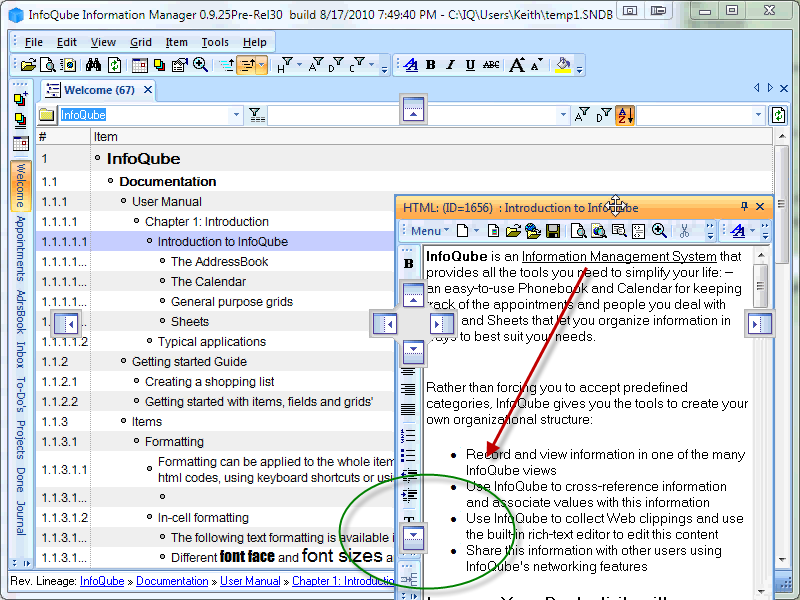
 Drag the pane towards the bottom box as shown:
 
--
--
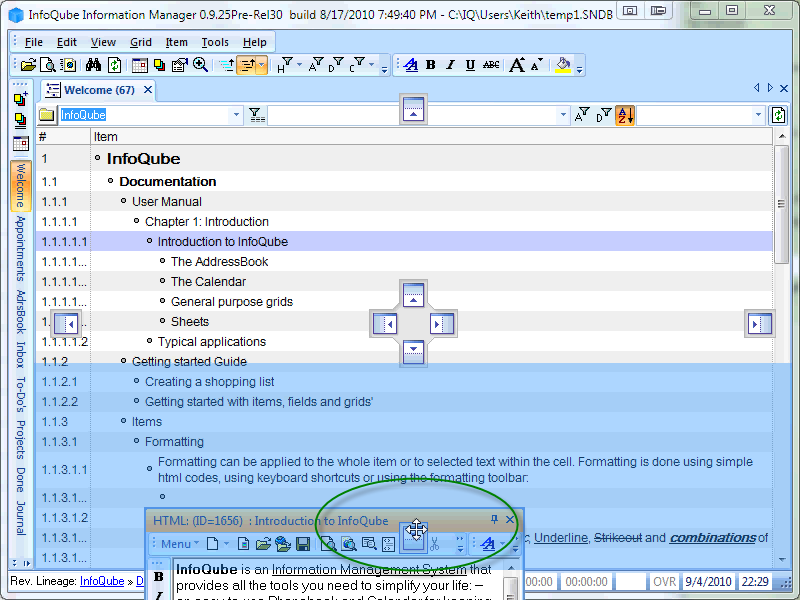
Hold the pane over the "box" and notice the shadow preview of where the pane is about to dock.
--
 
--
Drop the window (let up on the mouse): The pane docks into place at the bottom.