Four suggestions

Submitted by Al on 2010/09/10 18:57
1. Monthly calendar won't print. "Currently calendar has a bug when printing Week and Month views..." Monthly view is the only view I use, when will the bug be resolved?
 
2. Once upon a time IQ would save the margin settings in Print Preview, a few release back IQ no longer would save settings.
 
3. When will IQ start saving the open Grid configuration when closed.
 
4. Would like to be able to set appointment Reminder to be greater than 15 minutes; 1, 2, 3 and 4 hours.
 
Thanks
Al

v9.25 filter from Source bar iffy & done shortcut ng --> BOTH RESOLVED

Submitted by jan_rifkinson on 2010/09/09 18:09
There are times when I can't engage the Filter process from the Icon on the source bar
On those times I can engage it from Grid properties & add the filter I want to use
Then everything is ok
 
<CTRL>M does not seem to mark an item "done"
I have not checked the custom toolbar thingy
Just an observation

How to relate DateDue to Today, Tomorrow, ThisWeek, Next Week --> RESOLVED & WORKING

Submitted by jan_rifkinson on 2010/09/09 13:02
I see the equations in today & tomorrow but I don't understand what drives them, i.e. what date is it related to?
 
What I want to do is be able to assign a DateDue to an item & have IQ automatically calculate that it is due tomorrow or this week or next week
 
Is this possible?
 

Mystery bug ?? when trying to insert new item in one grid <SOLVED --> operator error>

Submitted by jan_rifkinson on 2010/09/09 10:03
Background
 
Yesterday, I changed the name "Journal date" to "Log Date"
and
I changed the format from mm/dd/yyyy to yyyy/mm/dd
 
Today I cannot add a new TLI in Daily Log grid
When I try by <ENTER> or via icon the same thing happens: the cursor jumps down to the next line & jumps back to the previous line
However, a new item is inserted in the "Journal" view which captures all items entered into the dB
 
I removed all sources, filters & sorts from the sorting line
the only one filter that seems to be working is the date filter, i.e. "Log Date" = date & # of  days
 
I did notice that the "Log Date" field did not update to the new format
 
Attached is a little video which illustrates the above description.

[How to] remove image file saved in the HTML pane

Submitted by Tom on 2010/09/09 09:27
 
I opened an image file from the HTML pane
I then saved the HTML pane contents
 
I want to delete the image now, but -
  • I am unable to - I can select it but not delete it
  • Browse mode is always on - I can't get out of it
  • I cannot edit in Blocknote ( I presume because it's not MHT & Browse mode always on )
  • I dont have word so I cant try that
Any tips?
 

automate a tedious task if possible --> TASK COMPLETED

Submitted by jan_rifkinson on 2010/09/08 20:04
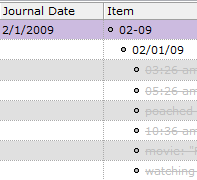
 Last year I started a daily log which was set up like this:
Then I CHANGED the setup to look like this
 
Although it's a bit confusing:
 
the old "Journal Date" is the first of the month 
The old item TLI = month expressed numerically
The child is the numeric date, i.e. current date
The grandchildren are the log entries
 
The new "Journal Date" is the numeric date, i.e.

Need help with Options in field management dialogue

Submitted by gregory on 2010/09/07 05:24
I'm trying to create my own task-management system based loosely on Dave Allen's GTD Getting Things Done approach.
 
One thing I want to be able to do is to classify items in my inbox on the basis of roughly when they need to be done. The overall approach is to use two fields, one called TaskPriority and the other the standard ToDos (which is a date field).
 
The idea is that when I first record an inbox item I classify it by TaskPriority.