pasting tab-indented and space-indented text from other apps into IQ

Submitted by jimspoon on 2019/09/13 12:25
I just discovered that if you have an "outline" in the form of tab-indented text in a text editor, and you copy and paste it into IQ, IQ will automatically create items and subitems corresponding to the number of tabs preceding each line.  Beautiful!  Great job, Pierre !!
 
Now for the "outline" in my Tabs Outliner Chrome extension.   I can drag and drop a parent and its children to other apps, and the results vary between destination apps.  If I drag to a text editor, each new level is represented by a four-space indentation.  (If I drag and drop a TO parent into Word or IQ, no children are pasted at all.)
 
In my Notepad++ text editor, I can quickly replace each 4-space indentation with a Tab, and then I can cut paste the resulting text into IQ with the desired results.
 
It would be nice if IQ would handle each 4-space indentation just as it handles tab-i
Related Items Links

Related Items are ad hoc bidirectional links between any 2 items, similar to "See Also" links seen in help files and documentation.
 

1. Adding Related Item(s)

To add Related Items links, use any of the following methods:
  • Select two or more items and do Item > Link Items (Ctrl+R). All selected items will be mutually linked
     
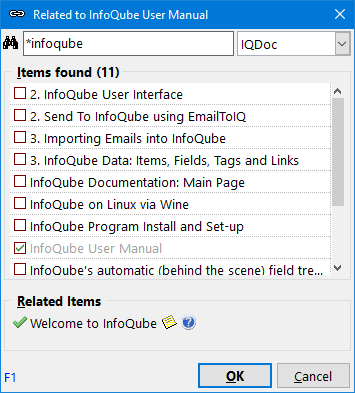
  • Select a single item and do Item > Link Items (Ctrl+R). The Related Items dialog will open:

    See 3. Using the Related Items Dialog below for details
     
  • Copy / Paste the Related Item links from one item to other item(s)

sticky select of non-contiguous items with keyboard

Submitted by jimspoon on 2019/09/12 10:02
I'm wanting to go through a grid, select mulltiple non-contiguous items, and assign a tag(s) to them.
 
Ctrl+click works well to select non-contiguous items, though if you click anywhere with Ctrl not pressed, you lose your selection.  And you know me, I'm always looking for keyboard-only ways to do things.
 
In Windows Explorer, moving the focus to another item using the arrow keys does not deselect previously selected items, so long as Ctrl is pressed.  This is also true of the IQ Live-Search tab, but not of a regular grid.  In a regular grid, Ctrl+down deselects the previous selection.
 
I've looked at using Marked Items as a substitute for the kind of selection I'm looking for - especially since it is REALLY a sticky selection, and the selection can't be lost by a mere click or arrow key with Ctrl not pressed.  But it's nowhere near as easy to do as Ctrl+Arrow Keys, Space.

How to capture just webpage title and URL (simple bookmark) without selecting text?

Submitted by carloscadu on 2019/09/12 08:11
  Hi,
 
I'd appreciate your help.
 
As shown in the screencast (http://bit.ly/2ZSvXSJ), by using InfoQube universal clipper, I am trying to capture just the webpage title and URL, without selecting any text.
InfoQube creates the item with the correct webpage title, but the URL is missing.
Also, the item note is filled with the last clipboard content, but it is undesirable. I'd prefer to have the note filled with the correct URL instead.
 
How to capture just webpage title and URL (simple bookmark) without selecting text?
 
Thank you,
Carlos

How to add line break after an HTML table/box in Doc Pane

Submitted by carloscadu on 2019/09/12 07:32
Hi,
 
I'd appreciate your help.
 
As shown in this screencast (http://bit.ly/2ZWca4L), I pasted HTML content into InfoQube Doc Pane, and the last element is a table/box.
 
I'm trying to write in Doc Pane, in a blank area after that table/box, but InfoQube keeps the cursor focus inside table/box.
 
Is it possible to add a line break and start writing after a table/box in Doc Pane?
 
 
Thank you,
 
Carlos

The best cross-reference workflow

Submitted by carloscadu on 2019/09/10 09:11
Hi,
 
I'd appreciate your help regarding the best workflow to cross-reference an item in InfoQube.
 
I've recorded my screen showing the procedure I'm doing (http://bit.ly/2ZQkfbk), which is lengthy and I'm wondering if there is a simpler, faster workflow to get the job done:
 

1- I selected and copy item (a) to be cross-referenced.

2- Paste item (a) into the cross-reference field (custom) of item (b).

3- Return to item (a) and copy the item ID.

4- Go to item (b) again, pasting the ID as a hyperlink.

Thank you very much,

Carlos

IQ freeze with event details dialog open

Submitted by LeftEccoForIQ on 2019/09/10 04:51
Just experienced an irrecoverable freezing of IQ when having the event details dialog open for a calendar item, then alt-tabbing to other programs / doing other work. Maybe the issue is similar to the one you recently fixed with regard to the options dialog (something about opening / not closing the database?)? Thanks!