Copy/paste of synced events in calendar

Submitted by LeftEccoForIQ on 2019/09/26 07:18
Coping and then pasting a synced event in the calendar will lead to this issue:
1. on paste, the event is moved rather than copied
2. on scrolling the calendar, the event will split into two separate events in the destination time slot
3. at one point after messing around with those split items, I was unable to use drag and drop on any items in the calendar - after scrolling the items would always return to their starting slot in the calendar.

Omnibox search for 'word only'

Submitted by LeftEccoForIQ on 2019/09/26 03:55
When I search for something like 'me', I will get all kinds of results, like 'meine' or 'mechanicon'. Being able to tell IQ that I really wanted to find only the word 'me' would be great. Hence I would like to request a kind of operator that would find "me" only if there wasn't an alphanumeric character adjoining on either side of the search string. Notepad++ search, for example, has this feature. I thought Ecco had it, too, but apparently it doesn't.

Adding Tags - What's the Keyboard Shortcut, New Tags Dialog partially out of screen

Submitted by patteoks on 2019/09/25 23:56
1. How do I find the keyboard shortcut to add a new tag ?
 
2. When I right click within the Tags windows, a New Tag dialog box appears, but 1/4 of the dialog box is outside of the laptop screen, that is I cannot see the left quarter of the dialog box. I have to always drag the New Tag Dialog Box entirely within the screen each time I add a New Tag. How do I fix this ?
 
Thank you for your help.
 

How can I change the settings in the ini file in infoQube?

Submitted by firstteamm on 2019/09/25 14:16
 
I am stuck at the first stage of getting to even see IQ open in my window laptop.
 
Believe the Appdata "settings" need to be changed including the Name, ID and Key .
 
Trouble is when I go to the file explorer and open the said settings it opens up the text file associated with the settings.
 
I could change that , but cannot save it back into the program file area (lack of permission or something related to that is the error message).
 
I need advice how to overcome that.
 
Am not sure if that is all need to do get the program running.

Adding quotes

Submitted by WayneK on 2019/09/25 00:14
Does anyone have a method that will add quote marks at the beginning and end of an item?  I've been doing it manually, and it gets tiresome if you're processing a lot of items.
 
I might be able to do it with my text expander software but first thought I'd check to see if someone has a method within InfoQube.
 
Wayne

Drag and Hyperlink Outlook Item

Submitted by josh on 2019/09/24 13:42
 Hi,
 
I've been trying for the past day to drag and drop an email from Outlook to a grid. Once dropped the item is created with the Subject of the email as the Item Name and the item name is also a hyperlink, unfortunately when I click on the hyperlink, or Ctrl+Click it doesn't open the email or do anything.
 
Am I doing something incorrectly? Or is this not possible?
 
Cheers,
Josh

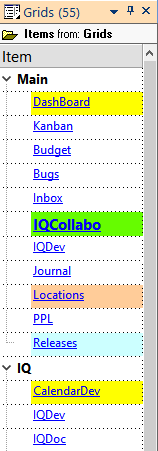
Creating a grid of grids

Grids are always shown a flat list. To arrange these in a hierarchy, create a hierarchy of items, each being a hyperlink to a grid
 
To do so:
  1. Open the Manage Grids dialog
  2. Select one or more grid
  3. Right-click and select Copy
  4. In a grid (perhaps an empty one), do Edit > Paste Special > IQ View
  5. An item will be created for each grid
  6. Create grouping items and move "grid" items under appropriate group
  7. Hold the Ctrl key when moving an item to place the item under more than one group
  8. Add formatting (font size, color, back color) to help locate each grid
  9. The grid is then detached and docked to the side of the main IQ UI
  10. Turn Auto-Search on to locate grid by simply typing a few characters


Streamlining Multiple Parent Usage

Submitted by David_H on 2019/09/22 21:59
 I am starting to use IQ in a way that there are many items that I would like to have under multiple parents. However this is the one area where for something like CRM a regular less flexible program excels (though they have so many other limitations) and I would like to know if anyone has developed ways to streamline or automate the process in IQ. Example scenario - in a CRM program you might have a breakdown where you click on "Account ABC Corp" and see the following things related to that account:
 
  • Account Projects
    • Account Project Tasks
  • Account Contacts
    • Account Contact Tasks
  • Account Tasks
With a typical CRM program in the scenario above, I might assign Task 1 for Account Contact, John Smith for Account Project, Build Office Space.