one of the things that's so great about IQ

Submitted by jimspoon on 2025/09/29 19:49

I've been complaining about how I can't use my preferred software at work.  So I use Word for Outlining.  Better than nothing but it can't compare to IQ - no fields/columns for one thing.  I've also been experimenting with OneNote, because it's the only "notes" software I think I can use there.  I see all these good reviews for OneNote and think, what the hell?

Customizing toolbar buttons - back color options

Submitted by LM77 on 2025/09/28 09:16
Forums

Currently (unless I am missing something) it is possible to customize the toolbar by adding buttons to set back colors from the 10 "Item Back Color" options listed under Item - Back Color (i.e. from Red to Purple).

Would it be possible to add an option to provide such buttons for other, user-specified colors which do not appear in that list (for example, Teal and Sea Green, which I often use with dark mode)?

Thanks!

why isn't my grid indenting my items to show parent-child relationships?

Submitted by jimspoon on 2025/09/25 22:42

Sad to say, I haven't been able to work in Infoqube much lately.  I sorely miss being able to use IQ at my job, but I am not permitted to use any software but what they have approved.  They even rejected my request to use a simple "Tab Renamer" extension for my browser.  It's hopeless to ask permission to use anything but what's on the "approved list".

I am not able to enter info in Table; row2, col2

Submitted by viking on 2025/09/21 20:49
Forums

Sorry for a lot of questions lately, but I have been trying to use IQ in new ways.
Also sorry if this is a trivial question...
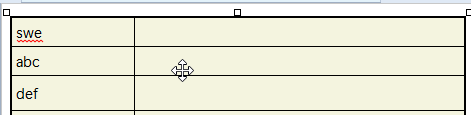
I am often not able to enter information in a Table in the Doc pane. I open an html template in the doc pane.

When I hover over the table, the cursor turns into double arrows (for table resizing):

Table

Set Table Row Height?

Submitted by viking on 2025/09/20 20:06
Forums

I have inserted Tables in the Doc pane.
Often the row height of a row is suddenly increased. If I try to drag to reduce the height, the row height below it increased. 
I often end up with a mixture of row heights.

Can I somehow select the whole table and set the row height for all rows (e.g. to default)? 

View Item By Form Issues

Submitted by viking on 2025/09/19 22:12
Forums

Not sure if bugs or feature requests..

I am using the "View Item By Form" popup dialogue:
1. I delete a field in the form, save it, and close. However, the field is not deleted.
2. In a date field,  I open the popup calendar to set a date and time. However, the popup calendar is missing the buttons to show the item in the main calendar and to set an alarm.  
(These buttons are also missing when creating a new item by using the "Add by Form" popup window and editing a date field)

Making items into children of their tags

Submitted by lucasd on 2025/09/09 14:29
Forums

As far as I am aware, it isn't officially supported/recommended to make regular items into children of their tags, but for my purposes, InfoQube works much more intuitively when I do this. With this approach, I can easily view, in a single grid, a full hierarchy of tags and subtags with their items and subitems. (A good example of something similar is Wrike's implementation of virtual folders that function like tags.) Am I correct that this approach isn't officially supported, and if so, could it become supported?