Grid items count

Submitted by WayneK on 2017/07/27 11:21
This has been discussed a few times but I'm still having trouble understanding how InfoQube counts items when it loads a grid.  My understanding was that InfoQube counts only items that will be displayed.  It does not count collapsed subitems.  However, I keep getting warnings about number of items when it seems like I shouldn't.  Example follows.
 
1) I turn off hoist.
2) I receive warning about trying to load a grid with 1,056 items.  I choose "load all items" option.
3) Grid loads and there are only 100+ items displayed (not 1,000+).  In fact, the grid only contains 627 items when all levels are expanded.
 
So why am I getting the item number warning when only a handful of items will be displayed, and the grid contains well under 1,000 items if they were all displayed?
 
By the way, I'm getting the item counts from tooltips (hovering mouse over

0.9.99 - wysiwyg editor appears to deactivate/reactivate while editing, when text wraps to a new line

Submitted by jimspoon on 2017/07/25 09:58
Didn't see this little bug until i started using 0.9.99.
 
I am entering text into the Item field in the wysiwyg grid cell editor.  When I reach the end of the line and the text wraps to a new line, the editor appears to deactivate momentarily.  The background color of the cell being edited changes to the color of a cell that is not in edit mode.  But then the wysiwyg editor seems to reactivate automatically on the new line, and I can resume editing.  The "inactive" background color goes away.  It's a bit disconcerting visually, and there may be some delay involved in the apparent deactivation-reactivation, but I haven't really tested that.


I know its a basic function, but I just can not find out how: "How to , in a grid , group all items via a 'field'?

Submitted by seanlu21 on 2017/07/25 02:08
 Hi, in some of my Grid, it has an option said ' to drag a field ' to have a 'group by' view.
but in some of grid i created by myself, it doesn't have this option, 
then I also can not find from the menu,
can anyone tell me how , in a grid, to have a 'Group By' view , by chose any field ?
 
Best regards,
Sean 

Multi-Select Editor Sync Fields Bug

Submitted by David_H on 2017/07/25 00:12
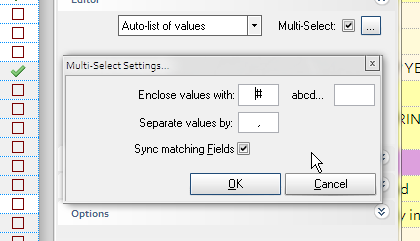
Version 99.  In the "enclose values with" use a value such as "#".  Now # prefixes every value, but in the process truncates the first letter of every value.  For instance, if the value is "Financial" (in my case I'm pulling the value from a grid), the pop-up list only shows "inancial" and once selected, shows "#inancial" in the column.
 
This only happens when "enclose values with" is used.  As soon as it's not used, the pop-up values are no longer truncated.  I predict this will be "fixed in V99a!" 
 
Thanks Pierre.

Item selection issue

Submitted by WayneK on 2017/07/23 20:21
I'm trying out 9.99 and want to commend Pierre for the excellent new features.
 
Now that I've been using it for a few hours, I'm having a problem with how cells are selected.
This is how I think selection should work (and how it has worked in the past):
 
1) Single click a cell:
   - the whole cell is selected and is ready to be copied in toto. 
   - If you start typing, text is appended to the end of the existing text.
 
2) Double click a cell:
  - edit mode is enabled
  - you cannot copy the entire cell (unless you now manually select all the text)
  - if you start typing, text is entered at the point where you double-clicked on the cell
 
In the past, I noticed inconsistency in the above rules: sometimes when I single-clicked a cell, it would enter edit mode.  It took me a

 
Here is a list of sample IQBases, mostly user-contributed, showing some applications of InfoQube:
 
IQ Functionality
 
-- link to nonexistent node ID 842 --   the shopping list from the default sample file  (KeithB)
-- link to nonexistent node ID 1373 -- Iq manual (captured Jan 2010)
Manage item recurrences in IQ manage item recurrences (Armando)
 
Workflow
 
Daily Grid / Diary example Daily (diary) grid sample   (KeithB)
My Workflow - SAMPLE file working with linked files; keeping track of item status/progress; simple time-tracking   (Tom)
Using IQ for writing & tasking  Writing project example   (KeithB from Jan's blog description)
Journal and AddressBook Journal to addressbook ideas   (KeithB per Jan ideas)
[node

How to use "form" in the Book Review Grid ?

Submitted by seanlu21 on 2017/07/19 09:39
 
there is a form used to ease the creation of a review under "Book Reivew" :
---qte---
Optional: To ease the creation of a review, you can create a form:
 
 
--- unqte ---
 
I am doing the similar thing in my database, I suppose when you add a new item in the grid with this 'form' as colomn sets... then the new item's 'item' field will become " Review".
 
But my test failed.
 
Do I have a wrong understanding ?
 
B.regards
Sean